
Pixymini – Free Browser Image Compressor
Tech Stack :
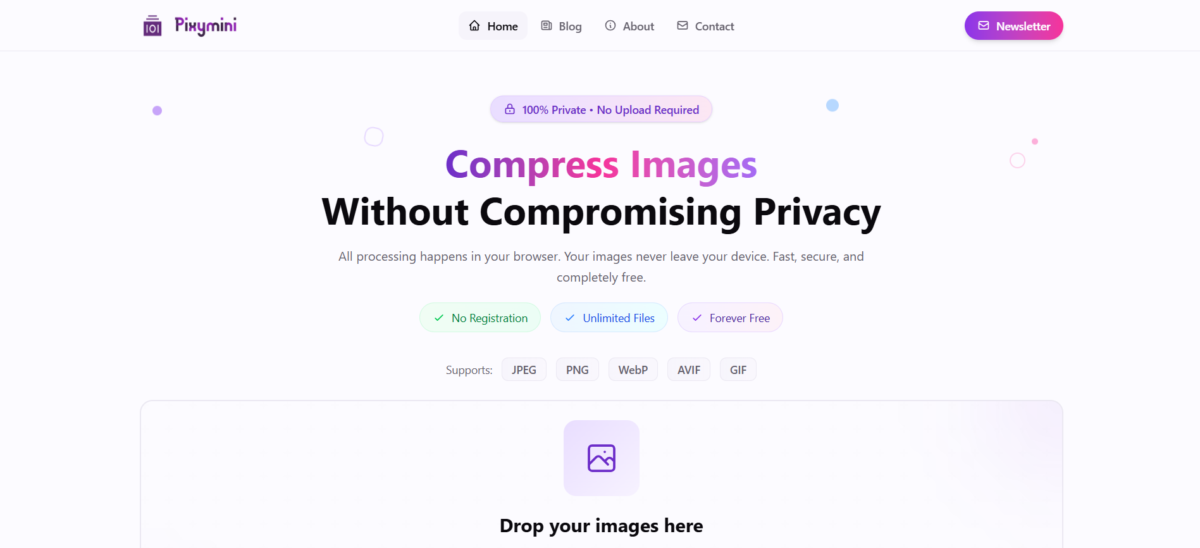
Pixymini is a free, privacy-first image compression tool that runs the entire compression pipeline directly in your browser using WebAssembly. No image ever leaves your device – there is no upload step, no cloud processing, no third-party server that touches your files.
Built on Next.js with a WebAssembly compression engine, Pixymini supports JPEG, PNG, WebP, AVIF, and GIF – and can convert between formats while optimizing file size. Two modes cover every workflow: Magic Mode applies smart per-format defaults (JPEG at 82%, WebP at 80%, AVIF at 75%, PNG lossless) for instant results with no configuration; Advanced Mode gives full control over quality, effort level, and output format for precision optimization.
Bulk processing handles hundreds of images in parallel using smart concurrency, with real-time compression statistics shown as each file completes. All results are available for individual download or packaged into a single ZIP. No registration, no watermarks, no file size limits, no queues – and because processing is fully client-side, Pixymini works reliably even in low-connectivity environments like much of East Africa, where uploading large files to a remote server is slow and costly.
Features
100% Private by Architecture
Pixymini’s privacy guarantee is structural, not a policy. Because WebAssembly runs the compression engine locally in your browser, there is literally no mechanism for your images to leave your device – no upload endpoint exists. This makes Pixymini fundamentally different from TinyPNG, Squoosh’s cloud mode, or any tool that processes files on a remote server.
WebAssembly-Powered Compression
The compression engine runs via WebAssembly – a near-native execution environment in the browser. This gives Pixymini performance characteristics closer to a desktop app than a web tool: fast startup, efficient memory use, and consistent results across sessions without a server round-trip.
Magic Mode & Advanced Mode
Magic Mode applies proven per-format defaults in one click – no configuration needed. JPEG compresses at 82% quality, WebP at 80%, AVIF at 75%, and PNG uses lossless compression. Advanced Mode unlocks full control: adjust quality on a per-format basis, set effort levels (which trade processing time for better compression ratios), and select the output format independently of the input.
Five Format Support + Conversion
Pixymini accepts JPEG, PNG, WebP, AVIF, and GIF and outputs in any of those formats. You can drop a JPEG and download a WebP, or batch-convert a folder of PNGs to AVIF – compression and format conversion happen in the same pass with no extra steps.
Bulk Processing with Real-Time Stats
Drop multiple files at once and Pixymini processes them in parallel with smart concurrency management. Real-time statistics appear as each file completes – showing original size, compressed size, percentage reduction, and processing time. No waiting for a progress bar to finish before seeing results.
Bulk ZIP Download
Once compression is complete, download every result in a single ZIP file. Individual files can also be saved separately. No account needed, no watermarks, no expiry on downloads – results are available immediately and stay available until you close the tab.
Works in Low-Connectivity Environments
Once the page loads, Pixymini requires no active internet connection to compress images. The WebAssembly engine runs locally, making it fully functional in offline or low-bandwidth environments – a practical advantage for users in Kenya and across East Africa where data costs and connection speeds make server-dependent tools genuinely painful to use.
No File Size Limits
Server-based compression tools cap file sizes to manage infrastructure costs. Because Pixymini has no server, there are no size limits imposed by hosting – the only practical ceiling is your device’s available memory.
Case Study
The Challenge
Most image compression tools are server-based: you upload your files, wait for processing, and download the results. That model has three hard problems. First, privacy - your images pass through someone else's server, and you have to trust their data policy. Second, cost-driven limits - hosting bills force file size caps, queues, watermarks and sign-up walls. Third, and most acute in East Africa: uploading large images over slow, expensive mobile connections takes longer than the compression itself.
The Solution
Pixymini moves the entire compression pipeline into the browser with a WebAssembly engine - there is no upload endpoint at all. It is built on Next.js with a Turso SQLite backend for lightweight persistence and deployed on Cloudflare Pages. Two modes cover every workflow: Magic Mode applies proven per-format defaults for one-click results, while Advanced Mode unlocks per-format quality, effort levels and output format selection. Five formats are supported (JPEG, PNG, WebP, AVIF, GIF) with conversion in the same pass, and bulk processing runs hundreds of images in parallel with real-time stats and a single ZIP download.
The Results
Privacy became a structural guarantee instead of a policy promise - no mechanism exists for images to leave the device. File size limits disappeared along with the server, and the tool keeps working fully offline once the page has loaded, which matters where connectivity is unreliable. Bulk jobs that would queue for minutes on server-based tools finish in parallel locally, and the stack costs pennies to run since the heavy lifting happens on the visitor's device.